SMS Messaging & Opt-In
Last updated: September 3, 2026
Bidaful operates the Bidaful mobile app, a marketplace that connects homeowners (“Customers”) with independent, insured home-service professionals (“Pros”). Customers post a job, compare bids, accept one, pay into escrow, and schedule the work; payment is released to the Pro after the job is done. This page explains our SMS program and shows exactly how a user consents to receive text messages.
1. Messaging program summary
- Program name: Bidaful Account & Job Notifications
- Program type: Transactional / account notifications only. No marketing or promotional messages are ever sent.
- Who receives messages: registered Customers and Pros who provided their mobile number and checked the SMS consent box during sign-up.
- Message frequency: varies with your job activity — typically a few messages per active job; none when you have no active jobs.
- Cost: Bidaful does not charge for messages. Message and data rates may apply from your carrier.
- Help: reply
HELPto any message, or email support@bidaful.com. - Opt out: reply
STOPto any message at any time.
2. How users opt in (Call-to-Action)
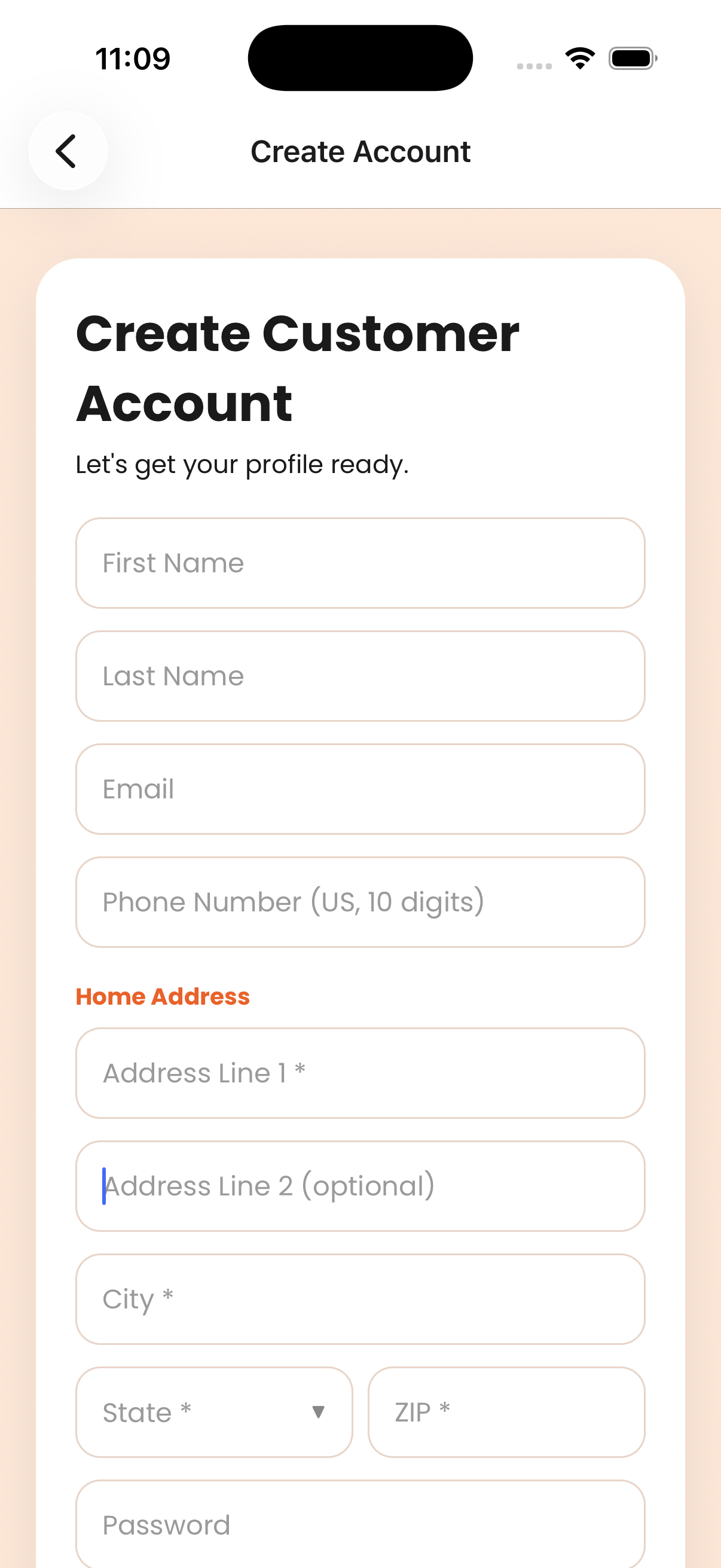
Opt-in happens in one place only: the Create Account screen of the Bidaful mobile app (one version for Customers, an identical one for Pros). There is no website sign-up and no keyword/short-code opt-in. The steps a user takes:
- Download the Bidaful app and tap Sign Up, then choose Customer or Pro.
- Enter name, email, mobile phone number, address, and a password.
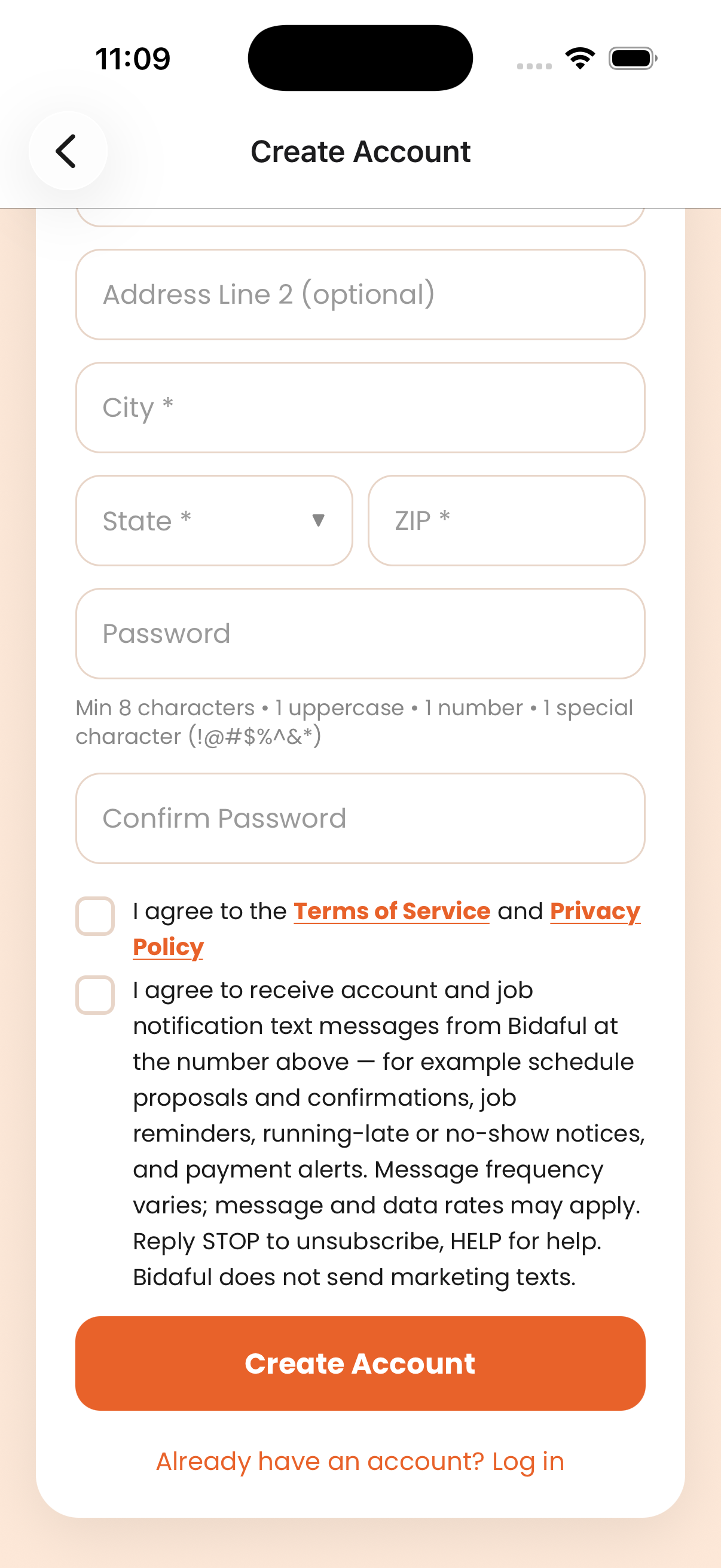
- Check box 1 (unchecked by default): agreement to the Terms of Service and Privacy Policy.
- Check box 2 (unchecked by default): consent to receive account and job notification text messages. The exact wording is shown below.
- Tap Create Account. The form cannot be submitted unless both boxes are checked.
Exact SMS consent wording shown next to the checkbox:
“I agree to receive account and job notification text messages from Bidaful at the number above — for example schedule proposals and confirmations, job reminders, running-late or no-show notices, and payment alerts. Message frequency varies; message and data rates may apply. Reply STOP to unsubscribe, HELP for help. Bidaful does not send marketing texts.”
Screenshots of the opt-in screen
Text recreation of the consent area
Create Account
3. Types of messages we send & sample messages
All messages are service notifications tied to a job the user created or bid on:
- A Pro proposed, confirmed, or re-proposed a scheduled time
- A reminder before a scheduled job
- A Pro is running late, or did not arrive
- A new bid was received, or a bid was accepted
- Payment confirmations and alerts (hold placed, payment captured, refund issued)
4. Opt-out and help
- STOP — reply STOP to any message to stop all text messages. We reply once to confirm: “Bidaful: You are unsubscribed and will receive no more texts. Reply START to resume.”
- HELP — reply HELP for: “Bidaful account & job notifications. Msg frequency varies. Msg & data rates may apply. Email support@bidaful.com. Reply STOP to unsubscribe.”
- Opting out does not delete your account, but you may miss time-sensitive job information.
5. Privacy
No mobile information — including your phone number and your SMS opt-in — is shared with, sold to, or rented to third parties or affiliates for their marketing or promotional purposes. See the Privacy Policy (Section 3, “Text messaging”) and the Terms of Service (Section 3) for full details.